How to Use the Hijune Handwritten Font in Your Creative and Professional Workflows
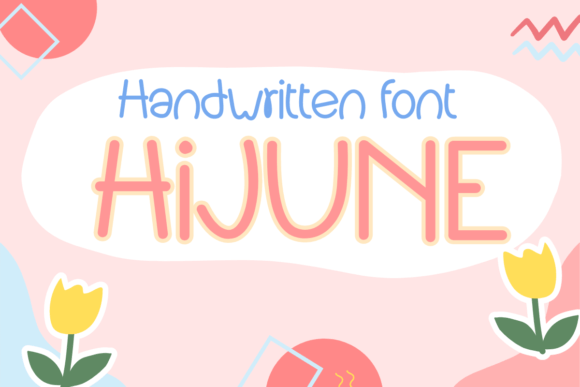
Fonts play a crucial role in how we communicate visually, whether in digital or print formats. One such font that stands out for its natural, personal touch is Hijune, a handwritten typeface designed to mimic authentic cursive writing. Its fluid strokes and organic feel make it ideal for projects where warmth and individuality are key. But beyond aesthetics, Hijune can be integrated into various stages of your workflow — from planning to execution — offering both creative and practical benefits.
Understanding Hijune: A Versatile Handwritten Font
Hijune is more than just a decorative font; it's a tool that enhances readability while maintaining a human-like appearance. Unlike many stylized fonts that sacrifice legibility for flair, Hijune strikes a balance between artistic expression and clarity. This makes it suitable for a wide range of applications, including but not limited to:
- Taking notes during brainstorming sessions
- Creating personal diaries or journals
- Designing greeting cards or invitations
- Producing banners, social media posts, and marketing materials
- Printing on mugs, shirts, and stationery items
Its adaptability lies in its ability to evoke emotion without overwhelming the content. When used correctly, it adds a layer of authenticity to your work, making it especially valuable in branding, education, and personal development contexts.
Integrating Hijune into Your Planning Phase
Before diving into any project — whether professional or personal — having a clear plan is essential. This is where Hijune can subtly shine. Many professionals use handwritten notes for ideation, sketching, or outlining because the process feels less rigid and more intuitive. Using Hijune as the basis for digital versions of these notes allows you to maintain that same feeling of spontaneity while keeping everything organized and accessible.
For example, when preparing a presentation or blog post, try using Hijune in your initial outline. It helps create a sense of flow and creativity, encouraging free thinking. Once the structure is solid, you can switch to a more formal font for the final version. This dual approach supports both the conceptual and execution phases of your work.
Workflow Tip: Pair with Mind Mapping Tools
If you're using mind mapping software like XMind or Miro, consider embedding text elements in Hijune for labels or key ideas. The visual contrast can help distinguish primary thoughts from supporting details, improving clarity during early-stage planning.
Using Hijune During Execution
Once the planning is done, the execution phase requires consistency and efficiency. Here’s where Hijune can either be a central design element or an accent that highlights specific parts of your work. Depending on the context, it can serve different purposes:
- Content Creation: Bloggers and marketers often look for ways to stand out. Incorporating Hijune into headings or pull quotes gives a unique, handcrafted feel to otherwise standard layouts.
- Graphic Design: Designers working on promotional materials, infographics, or website headers can use Hijune to add a personal touch, especially in niches like lifestyle, wellness, or educational platforms.
- Product Design: For entrepreneurs and small business owners, customizing merchandise like T-shirts, mugs, or packaging with Hijune can create a memorable brand identity.
When using Hijune during execution, ensure that it aligns with your overall design system. Since it's a handwritten font, it works best when paired with clean, sans-serif or serif fonts to avoid visual clutter. This combination maintains professionalism while adding personality.
Implementation Example: Social Media Post Design
Imagine you’re launching a new product and need engaging Instagram posts. Start by creating a background image with a minimalist layout. Then, overlay a short, catchy headline in Hijune. The contrast between the simple background and expressive font draws attention naturally. You could even pair it with a second line of body text in a neutral font to keep the message readable and impactful.
Post-Project Uses: Enhancing Final Outputs and Documentation
After completing a project, the way you present the outcome matters. Whether you're documenting a learning journey, summarizing a client pitch, or publishing a finished product, Hijune can enhance the final output. Its handwriting style is particularly effective for sign-offs, acknowledgments, and thank-you messages.
Educators might find value in using Hijune for student feedback or certificates. The font conveys sincerity and care, which is important in building rapport and trust. Similarly, freelancers or consultants can use it in invoices or contracts to soften the formality of legal documents.
Observation: Consistency Matters Even in Handwriting
While Hijune mimics handwriting, it’s still a digital font and should be treated with the same level of consistency as other design elements. If you're using it across multiple platforms or deliverables, define usage guidelines. For instance, decide whether it will only appear in headers or also in subheadings and captions. This ensures a cohesive look and avoids unnecessary confusion for users or clients.
Compatibility and Usability Considerations
Before adopting Hijune into your workflow, check its compatibility with the tools you use. Most modern design and word processing software support custom fonts, but there are exceptions. Make sure to install the font properly and verify that it displays correctly across devices and browsers.
Usability is another factor. While Hijune is highly legible, it may not be the best choice for long paragraphs or dense reports. Reserve it for short, impactful texts like titles, quotes, or call-to-action buttons. Also, consider accessibility: if your audience includes people with dyslexia or visual impairments, supplement Hijune with high-contrast colors or alternative text options.
Tip: Use Web Fonts for Online Projects
For web-based workflows, convert Hijune into a web font format (like WOFF or OTF) using online tools such as Font Squirrel’s Webfont Generator. This allows seamless integration into websites or email templates without worrying about file compatibility or user download issues.
Long-Term Integration and Quality Control
As with any resource, integrating Hijune into your long-term workflow requires careful consideration. Begin by testing it in a few non-critical projects to gauge its effectiveness. Once you’ve confirmed its value, establish a routine for its use — perhaps through predefined templates or saved design assets.
Quality control is equally important. Ensure that all instances of the font are applied consistently in terms of size, spacing, and color. If you're collaborating with others, share the font file or embed it in shared templates so everyone uses the same version. Inconsistent application can lead to a disjointed final product.
Storage and Organization
Keep your font files organized within a dedicated folder in your digital asset library. Name them clearly, like “Hijune – Personal Use” or “Hijune – Commercial,” depending on licensing. This prevents accidental misuse and streamlines your design process over time.
Combining Hijune with Other Assets
The beauty of Hijune is how well it complements other design elements. Think of it as part of a larger toolkit rather than a standalone solution. Here are a few examples of how it interacts with common resources:
- Images and Photography: Use Hijune to add overlays or captions to photos, especially those with warm, candid tones. It blends naturally with lifestyle or travel photography.
- Audio and Video Content: For video intros or subtitles, apply Hijune sparingly to highlight key phrases. Avoid using it for extended narration due to potential legibility issues.
- Print Materials: When designing flyers, posters, or brochures, Hijune can serve as a stylistic anchor. Just be mindful of printing resolution to preserve its fine details.
Case Study: Branding a Stationery Line
A small business owner recently launched a line of eco-friendly notebooks and planners. They chose to use Hijune in their logo and packaging design to reflect the handmade nature of their products. The font was embedded into the company's website and used in product descriptions, reinforcing the brand's identity across all touchpoints. As a result, customer engagement increased, and the brand felt more personable and trustworthy.
Practical Applications Across Industries
Hijune isn’t limited to one field — its flexibility allows it to fit into diverse industries. Below are some tailored use cases:
Education and Learning
Teachers and students alike can benefit from using Hijune in study guides, flashcards, or motivational posters. Its handwriting style mirrors the notes students take during lectures, making it easier to connect with the material. Educators might also use it in presentations to emphasize key points or instructions.
Marketing and Advertising
In marketing campaigns, Hijune can be used to craft personalized messages or testimonials. For brands targeting an audience that values authenticity, this font adds a human touch to digital ads, landing pages, and email newsletters.
Personal Development and Productivity
Freelancers and productivity enthusiasts often rely on handwritten-style fonts for habit trackers, vision boards, or goal-setting templates. Hijune brings a tactile quality to digital tools like Notion or Canva, helping users stay motivated and focused.
Best Practices for Working with Hijune
To maximize the effectiveness of Hijune, follow these best practices:
- Use Sparingly: Apply it only where it adds value. Overuse can reduce readability and dilute its impact.
- Pair Thoughtfully: Match it with complementary fonts to maintain balance in your designs.
- Test Across Platforms: Confirm that it looks good on mobile screens, tablets, and desktops before finalizing any project.
- Consider Licensing: Always review the font’s license agreement to ensure it fits your intended use case, especially for commercial projects.
Tip: Combine with Color Theory
Handwritten fonts often benefit from being set against contrasting backgrounds. For instance, light gray text on a white background may look too soft, whereas dark navy or charcoal black offers better visibility. Experiment with color combinations to find what works best for your audience and medium.
Conclusion: Elevate Your Workflow with Purposeful Typography
Hijune is more than just a font — it's a versatile tool that can enrich your creative and professional processes at every stage. From ideation and planning to execution and documentation, it offers a bridge between digital precision and human expression. By understanding its strengths and limitations, you can integrate it seamlessly into your existing systems, enhancing both the aesthetic and emotional resonance of your work.
Whether you're designing a product, crafting content, or managing a project, consider how Hijune can support your goals. With thoughtful implementation, it becomes a subtle yet powerful component of your workflow, helping you stand out while staying grounded in practicality and usability.